
Query planning
PulsusDB treats query behavior as the input to schema design. The planner aims to read the smallest correct set of rows, push safe work into ClickHouse, and preserve the source language’s semantics.
Planning stages
Section titled “Planning stages”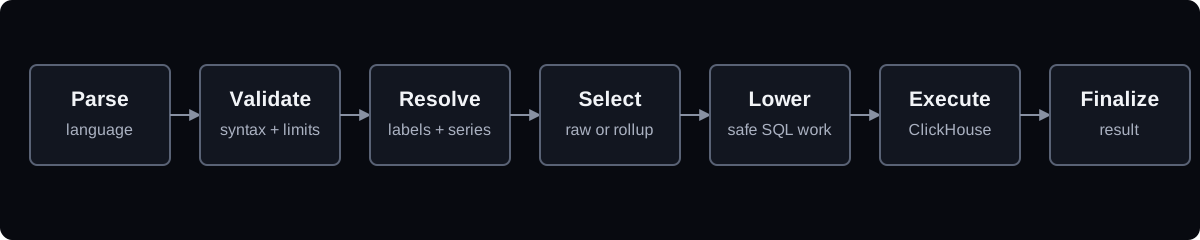
Parse and validate
Section titled “Parse and validate”Each front end produces a typed representation of LogQL, PromQL, or TraceQL. It rejects unsupported syntax and applies query budgets before expensive work begins.
Resolve labels first
Section titled “Resolve labels first”Selectors use index tables to produce candidate fingerprints. The planner bounds these intermediate sets to prevent a broad matcher from creating unbounded fan-out.
Choose raw or rollup data
Section titled “Choose raw or rollup data”For metrics and exact log aggregates, the planner can choose a rollup whose resolution fits the query range and step. It falls back to a finer level or raw data when a rollup would change the answer.
Lower safe work
Section titled “Lower safe work”Time filters become PREWHERE. Label, attribute, and line filters are pushed only when ClickHouse can reproduce the source language’s semantics. Partial aggregation runs on shards where possible.
Finalize in Rust
Section titled “Finalize in Rust”Operations that cannot be expressed faithfully in ClickHouse remain in the Rust evaluation layer. The result should be complete or return a named limit error; broad aggregates must not be silently truncated.
Explain a query
Section titled “Explain a query”Send the optional header:
X-Pulsus-Explain: 1The response can expose planner stages, generated SQL, and routing information. Use this while diagnosing unexpected reads or rollup choices; avoid enabling it indiscriminately in public clients because query plans can contain operational details.
Example
Section titled “Example”{service_name="checkout"} |= "timeout"A typical plan:
- resolve
service_name="checkout"through the log stream index; - bound the scan to the request interval and matching fingerprints;
- use a text/skip index for the line term when eligible;
- order and limit the selected entries;
- format the product-neutral logs response.